
Before requesting cancellation, check the minimum term and notice requirements agreed for your service. The cancellation option in the client area does not replace those terms. Contact billing if your renewal date is close or anything is unclear.
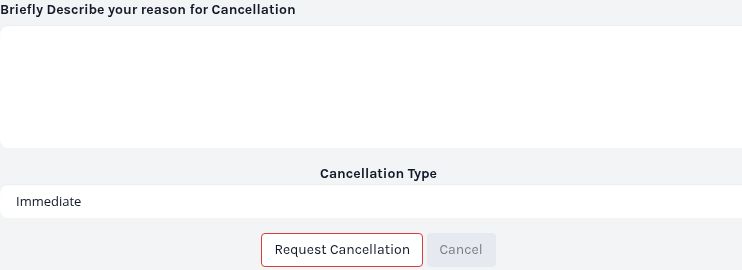 Client cancellation. Account details are excluded from this view.
 Client shortcuts. Account details are excluded from this view.
Steps
- Save an independent copy of all required website files, databases, email and configuration. Download what you need while the account is accessible and verify that the copies can be used.
- If moving provider, complete and test the migration first. Check website forms, new orders, email delivery and DNS. Keep access to the domain registrar separate from hosting.
- Submit a written support ticket from your signed-in client area stating the exact service, domain and requested end date. Ask us to confirm the notice requirements, outstanding charges and effective cancellation date.
- The service details page may also offer Request Cancellation. If using that form, check the service carefully, give the reason and review Immediate versus End of Billing Period. Do not submit an immediate request while you still need data or access.
- Retain the written confirmation and review any outstanding invoices with billing. Do not assume a cancellation request removes existing payment obligations or creates a refund.
- Review separately registered domains and any recurring payment arrangements. Confirm which should continue, transfer or stop, rather than assuming hosting cancellation changes them automatically.
Before access ends
Do not rely on platform backups remaining available after termination. Keep your own verified copies before the agreed end date. Stopping a payment or deleting your website is not a written cancellation request.
For the current published terms, see our Terms and Conditions. If those differ from the terms supplied for your service, ask billing to confirm the applicable agreement before submitting the request.
Related help
- How to Request a Website and Email Migration
- How to Check Hosting and Domain Renewal Settings
- How to View, Download and Pay Your Invoices
- JetBackup: creating, downloading and restoring backups
Further information: Dynamic Servers information · Official documentation.
Need help? open a support ticket. Include the affected domain and exact error, but never your password.