
This guide applies to Gravity, which uses Dynamic Servers’ bespoke Spam Quarantine tool. Uranium uses SpamExperts and has a separate guide. If you are unsure which server hosts your email, check your hosting details or ask support.
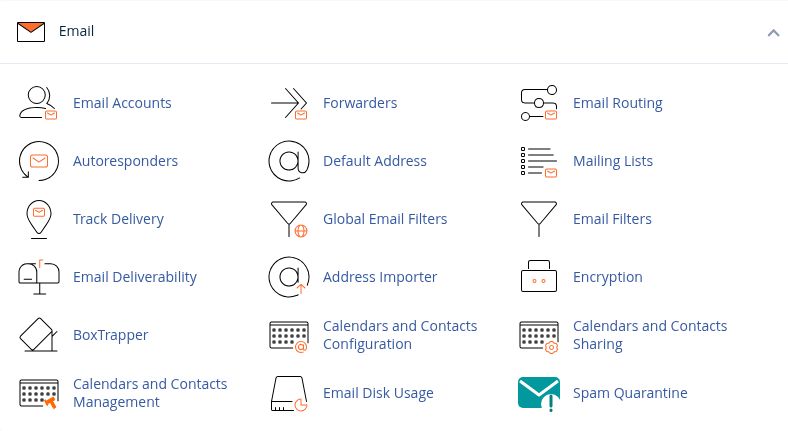 Email tools. Account details are excluded from this view.
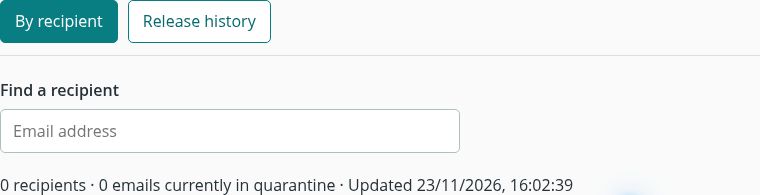 Quarantine search. Account details are excluded from this view.
 Track delivery quarantine. Account details are excluded from this view.
Steps
- Log into the correct cPanel account and open Email → Spam Quarantine.
- Leave By recipient selected. Use Find a recipient to find the address expecting the missing email. The list groups held mail by recipient.
- Open the recipient’s held messages when results are available. Check the sender, subject and date against the email you expect. A familiar display name alone is not proof that a message is genuine.
- Use the release option offered for a message you have verified. If the tool requires a review or release request instead, follow that process. Availability can depend on the message and its filtering result.
- Review the on-screen outcome and check Release history. A pending request is different from a completed release.
- Check the destination mailbox, including Junk. If the message still does not arrive, open a support ticket with its sender, recipient and approximate time, plus the release result.
If the list is empty
No retained spam is currently listed for the account or your search. This does not prove that every attempted email arrived. Rejected messages, virus quarantine and attachment quarantine are not shown in this tool.
On Gravity, Email → Track Delivery → Show Quarantined also helps identify held messages. Do not release unexpected attachments, payment requests or account-verification messages solely to see what they contain. Contact support if you cannot verify a message or need help with repeated false positives.
Related help
- How to Find Your Hosting Details and Server Name
- Uranium: How to Check SpamExperts and Release a Legitimate Email
- My Emails Are Not Arriving or Sending: What to Check
- How to Report Spam That Reaches Your Inbox
Need help? open a support ticket. Include the affected domain and exact error, but never your password.